

Zoom is a US company and they create a video conferencing solution. Their app user base has grown hugely over the last months and with that came the criminals. However, the blame was placed at the coding – but is that all the issue here? Is there something simpler that could be done to fix this and other apps? I took a look at the apps I use on a daily basis and I saw a common theme to which Zoom fell into the trap of. Let’s look at what you use and if you read the manuals too.

Zoom has a free version which can host up to 100 participants for 40 minutes right up to a paid for Enterprise version with no meeting duration limits. All sounds good so far and when you compare it to Teams, Skype, Webex for the average user, Zoom is an easy to use, simple start. Indeed Gartner pitches Zoom ahead of heavyweights like Cisco which produces Webex an industry standard tool – a solid 4.7 compared to a 4.5!
But … and there is always a but …
In this post I am going to concentrate on the education sector and why vendors need to think more about their apps.
When Covid-19 struck and we were sent into isolation, barricaded at home, people tried to go about their usual daily work lives and schools tried to stay in contact with their students.
So, let’s think about the requirements that a teacher is going to need satisfied to continue online lessons.
- Needs to be Free
- Needs to work on many devices (Mac, Phones, PCs)
- Needs to be easy to use both as presenter and student
- Needs to be easy to get into the lessons with
- It just needs to work!
- Should be able to hold a classroom of say 30 kids
- Should allow some interaction
- Be able to do a class, say 30 minutes in length
Well, without having to do the comparison tables for you – Zoom actually satisfies all of that under its free version especially when competing products seemed to be struggling. Reading Twitter (a good gauge for opinion) Microsoft Teams seems to have become a real issue for businesses with reports of poor quality and poor up-times.
So, for cash-strapped schools that are under pressure to keep going, this was a quick and simple solution, and with the UK Government using it, it must be OK?
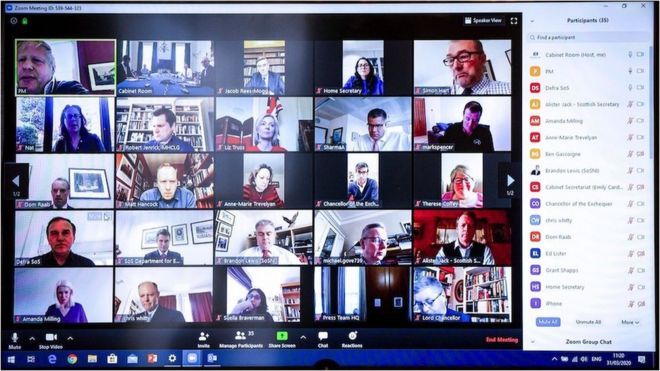
Well if Boris can use it, then we should be OK, right?
And so schools set off using this new tool Zoom, installing it, trialling it with teachers initially, all working seamlessly and out to students – and at first it was a successful transition. Indeed Zoom responded to the unprecedented demand from schools by lifting the 40-minute limit for schools. Unprecedented? Zoom reported that they went from 10 million daily active users in December 2019 to over 200 million daily active users in March 2020.
But … and there is always a but …
For every good idea, there is always someone to ruin the party
Without getting too technical, a Zoom meeting works by you sharing a meeting iD. So, if you know the meeting iD, you can join the meeting. What if you are not supposed to be in the meeting? Can you join it?
Well, with the basic settings out of the box, yes you can. So, if you know the meeting iD of a school lesson, you too can join that lesson … that’s using the settings out of the box. If you go into the settings, you can put passwords in place, you can turn off screen sharing from your attendees and so on … but that is not the default.
ZoomBombing
ZoomBombing is where uninvited attendees break into and disrupt your meeting. Essentially people are either guessing meeting iDs or simply using Google for those who may have left links in the public domain. Indeed, a quick Google search this morning and I was able to find Yoga sessions, Churches, a Rotary Club and online singing lessons.
Disrupt how? What are these people doing in? Well you don’t need to use your imagination too much to know that things probably started small and ended big. One of the issues with the default set up is that attendees can share their screens and so meeting help with the Verge were hit, a school in Utah got hit – and so ZoomBombing became a thing. This also spread to other apps for example Whereby – a similar app to Zoom, where a naked man appeared in a Whereby session with a Teacher and three 9-year-old-children. (Original Article – Translated Article).

OK, everything above is public knowledge now and Zoom has fixed some of it’s issues and this is just the usual news cycle isn’t? Popular app has vulnerability exploited by criminals … this is the norm. Vendor fixes stuff and criminals move on to the next target.
The Second Story
Pick an app you use a lot. Say a social media account or your email. Go ahead and double click the link to open the app up. It’s OK, I’ll wait:
- Word
- Excel
- PowerPoint
- Zoom
- Teams
- Facetime
OK … where was your security prompt?
With all these apps there is a common problem that Zoom also fell into. They made the usability of the app the primary focus and security got put into the background.
 We have long asked for security to be transparent, there but not in the way. We want software that is feature rich and out-of-the-box usable. You clicked your link or app above and straight in, all features available, simple to get int. But at a cost … security was lowered.
Is putting security in third place the best course of action?
Zoom is feature rich, it is free, it is simple to install, it is simple to set up a meeting with … but where is the security prompt?
I call out Zoom here in this post, but this goes for so many other apps and websites. Zoom was just one of the many hundred, thousands of cases where security became the third option.
What if …?
- When you install Zoom it asks you for to do 2-factor authentication right from the get go. No option to bypass, if you want to log into Zoom from somewhere else, you need that second factor of authentication.
- When you type in a password to access the system it says, we checked HaveIBeenPwned and this password is public in a data breach, try again.
- When you set your profile up it is totally hidden and you have to allow access to it.
- When you set up your meeting it states “and your password for this meeting is: [insert 12-digit code here]”
- When you type in a password it asks which password manager are you using.
- When you are in the meeting you have to request from the host to share your screen.
- All new users are automatically put into a waiting room until the host approves them entry.
You could argue that this is getting in the way of usability, and I ask straight back:
- Is that better or worse than allowing a 9-year-old girl to see a naked man on her screen during a class call?
- Any criminal taking over your Twitter account?
- Your Microsoft Teams account being hijacked as it’s the same password you used for LinkedIn in 2012?
and so on.
The rush to make successful apps and websites has meant that security got dumbed down. got nudged down the priorities. If we instead put at higher up the chain, we will create more secure systems, that have useful security features and will inevitably drive a secure culture as the user will see security more prominent. This will also drive down the number of security incidents that we have to fire-fight on a daily basis and make user’s data more secure. it will also be a differentiator between apps and services
In summary
If you work for a vendor and during lock down of Covid-19 have some spare time, try this:
- Do a bare-metal install of your solution.
- Don’t change any settings.
- Take yourself through the end-user daily grind of your app
- Note down all the missed opportunities for security
- Does your app allow Password Managers?
- Can you do 2FA to prevent multiple malicious logins
- Is your data being stored securely or is it in another unsecured web bucket?
- How do remote users access this securely>
If you are an end-user, when you launch an app or tool today, think to yourself:
- Where are my security prompts?
- How do I check HaveIBeenPwned to see if my password is out there already?
- Do I have good password hygiene?
- Can I use a Password Manager with this system?
- How is password strength measured in this app, can I have a 3-letter password?
- Am I secure using this app?
Sources used in this article:
Many thanks to the following sources for their excellent articles and websites. All links and attributions as above.
- Gartner
- DownDetector
- BBC
- FENews
- VentureBeat
- TechCrunch
- Metro
- NRK
- Zoom US
- GreyCampus

Leave a Reply